
✦ Matrix Multiplication & Advanced Operations
Master Matrix Multiplication: Complete Guide to Our Advanced Calculator
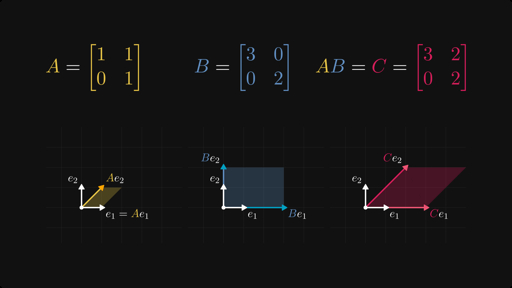
This visualization shows how matrix multiplication transforms vectors through linear combinations, a core concept our step-by-step solver demonstrates explicitly.
Why Matrix Multiplication Matters
Matrix multiplication transforms data in ways addition can’t. Engineers use it for coordinate transformations in robotics, neural networks multiply weight matrices during training, and computer graphics use it for rotations and scaling.
The operation follows strict rules: columns of the matrix A must equal the rows of Matrix B. A 2×3 matrix times a 3×2 matrix produces a 2×2 result—dimensions that don’t match throw immediate errors, which our tool catches instantly.
Step-by-Step: How to Use the Calculator
1. Set Matrix Dimensions
Enter rows and columns for both matrices using the four input fields at the top. Our tool auto-limits to a 12×12 maximum for fast browser performance while supporting the common 2×2 and 3×3 sizes students need most.
Pro tip: Start with the default 2×3 × 3×2 example—it demonstrates compatibility perfectly.
2. Build Your Matrices
Click “Build matrices” to generate input grids matching your dimensions. Each cell accepts:
-
Regular numbers:
5,3.14,-2.7 -
Complex numbers:
2+3i,-4i,1/2+2i -
Vectors work naturally as 1×n row vectors or n×1 column vectors
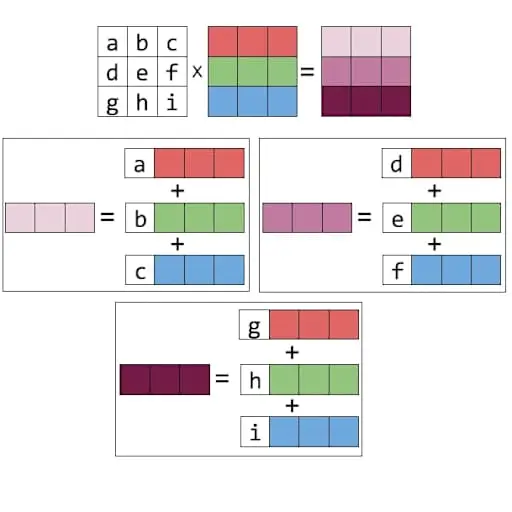
Basic matrix operations like addition and multiplication follow similar grid-based logic, as shown in this lecture slide.
3. Enter Your Values
Fill each cell row-by-row. Our parser handles various formats:
Valid inputs:
1+2i    (real + imaginary)
-3i     (pure imaginary)
0.5     (decimal)
1/2+3i  (fractions work)
Load sample data with one click to see complex multiplication in action immediately.
4. Calculate and Review
Hit “Calculate A × B”. You’ll get:
-
Result matrix rendered as a clean table
-
Step-by-step breakdown showing every multiplication and addition
-
Success/error messages with clear dimension warnings
Each result element shows its full calculation trace:
C[1,1] = (1×1) + (2i×2) + (3×1+i)
       = 1 + 4i + (3+i)
       = 4 + 5i
5. Export Your Work
-
Copy to clipboard for pasting into documents or other tools
-
Download CSV for Excel/Google Sheets import
-
Reusable result – chain into additional calculations
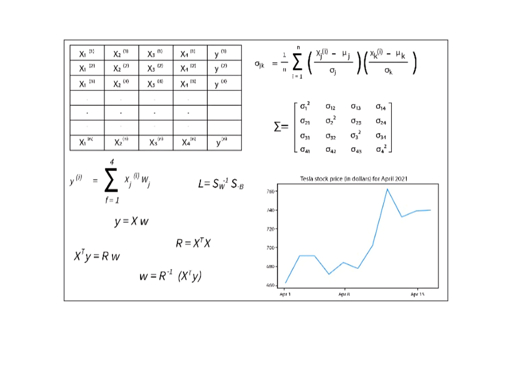
Linear algebra operations like matrix multiplication form the foundation of machine learning models, from covariance calculations to neural network layers.
Key Benefits Over Basic Calculators
| Feature | Our Calculator | Basic Competitors |
|---|---|---|
| Complex Numbers | Full support with smart parsing | Usually real-only |
| Step-by-Step | Complete calculation trace | Result-only |
| Vectors | 1×n and n×1 work naturally | Often unsupported |
| Export Options | Copy + CSV download | Copy-only |
| Error Handling | Dimension warnings + parsing errors | Silent failures |
| Custom Dimensions | 1×1 to 12×12 | Fixed 2×2/3×3 only |
Real-World Applications
Engineering & Graphics
3D transformations multiply rotation matrices by position vectors:
Rotation(90°) × [x, y, 1] = [-y, x, 1]Our tool visualizes exactly how each coordinate transforms.
This 3D cube diagram illustrates the tensor contraction in matrix multiplication, where inner dimensions (k) sum across layers.
Machine Learning
Neural network forward pass:
output = weights × inputs + biasTest different weight matrices instantly without Python setup.
Physics Simulations
State transitions in quantum mechanics use complex matrix products. Verify Pauli matrix multiplications or test unitary transformations.
Education
Step-by-step verification replaces hours of pencil calculations. Students see why each result element equals its value, not just the final answer.
Advanced Features Coming Soon
The “Extras” tab will add:
-
Determinant for square matrices
-
Inverse with condition number warnings
-
Transpose one-click
-
Scalar multiplication
-
Matrix power (A^n)
These fill gaps in competitors who focus only on multiplication.
Performance Optimized for 2026
Built with modern browsers in mind:
-
No server calls – instant pure JavaScript
-
Mobile responsive – works on phones/tablets
-
Memory efficient – handles 12×12 complex matrices smoothly
-
Dark mode native – eye-friendly for late-night study sessions
Common Errors and Fixes
“Incompatible sizes”: Columns of A ≠ Rows of B. Adjust dimensions using the controls.
“Invalid complex number”: Use 2+3i format, not 2+3*j or 2+3I. Our parser accepts most variations but needs standard notation.
Blank results: Click “Build matrices” after changing dimensions.
Get Started Now
Copy the HTML code from our previous response into index.html and open in any browser. No installation, no accounts, no limits.
Save time, eliminate errors, understand the math – that’s the matrix multiplication calculator advantage. Whether verifying homework, testing algorithms, or learning linear algebra from scratch, this tool handles the computation so you can focus on insight.